John Martyn

I just found out via Jigtime that John Martyn passed away.  He’s an artist I’d almost forgotten about, I had one of his albums years ago when I was in college in Dublin. Somewhere along the line I lost or misplaced it and never replaced it. I’d always meant to replace it and get to know his music better, and he was a great musician to see live. I’m annoyed at myself for not knowing his music better.

Sometimes John Martyn’s style reminds me a bit of Chris Rea, but with a more bluey bent and with the humming double-bass, other times just so ethereal. His early stuff was almost very traditional folk music (which I’m not familiar with).  Here’s John live in Dublin in 1987, singing “Sweet Little Mysteries”:

And an interview with him last year, in 2008:
http://www.youtube.com/watch?v=TkcmB8a1cn8

I’m sad that I never got to see him live, and I hope he’s enjoying the sweet little mysteries where ever he is.

Hi Lenny

Debian GNU/Linux 5.0, codenamed Lenny, was recently released. Here’s a round of of articles about the release and why you might want to consider Debian for your infrastructure.

Techworld sums up what this means for companies and highlights new features and security enhancements:

http://www.techworld.com/news/index.cfm?RSS&NewsID=110898

Debian 5.0, known as Lenny, will offer users improved security handling. For example, as an added protection measure, Debian Installer will now apply any security updates before the first boot.
In addition, several security-critical packages have been built with GCC hardening features, and the standard system contains fewer setuid root binaries and fewer open ports. Other new features include support for IPv6, NFS 4, PostgreSQL 8.3.5, MySQL 5.1.30 and 5.0.51a, Samba 3.2.5, PHP 5.2.6, Asterisk 1.4.21.2, Nagios 3.06 and the Xen Hypervisor 3.2.1.

Debian was proving to be particularly attractive, claiming that Debian was now the Linux distribution with the lowest total cost of ownership.

And Russell Coker mentions that Debian has full Xen support, which will make Xen users happy!

http://etbe.coker.com.au/2009/02/16/xen-and-lenny/

One of the features that is particularly noteworthy is that Xen has been updated and now works fully and correctly on the 2.6.26 kern

Sami Haatinen suggests that administrators utilize the apt-listchanges command:

http://ressukka.net/blog/posts/20090215_apt-listchanges/

It lists changes made to packages since the currently installed version. Sure that information will be overwhelming on major upgrades, but what is useful even on major upgrades is the capability to parse News files in the same way.

Debian 5.0 release notes are available at:

http://debian.org/releases/stable/i386/release-notes/

Me? I’m being running a mixture of Debian Stable, Testing, Sid, and Experimental on my Desktop and it runs stable 99% of time. A configuration like that isn’t recommended, as serious breakage can occur. But, this rarely happens, and I’ve Debian enough to know when not to let the package manager remove important packages! On my laptop, a Lenovo T400, I run Ubuntu Linux, see here for why.

Why use Lenny as a codename? All versions of Debian have been named after characters from the film Toy Story. The unstable version is codenamed Sid, and Sid will never be released as Sid breaks things. For a list of the previous names used see Section 6.2 here:

http://www.debian.org/doc/FAQ/ch-ftparchives

Lenny is named after a pair of wind-up binoculars.

Rails for Eclipse!

Aha! There is RoR support for Eclipse, via Aptana. I’ve just installed it and the instructions are a bit cryptic. Basically you have to install Aptana first (you can do this as an Eclipse plug-in). Then restart Eclipse and then install the Rails plugin called RadRails. Aptana also has Python and PHP support.

Install Aptana:

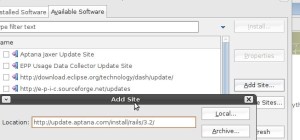
In Eclipse click on Help->Software Updates. Then click on the Available Software tab, then click on Add Site and paste this URL into the Dialog Box that opens:
http://update.aptana.com/install/3.2/

Eclipse Aptana Install Dialog

Install Aptana, then restart Eclipse. Aptana will then prompt you to install the Subversion plugin, then restart.

When Eclipse restarts following the same procedure as above, except add the following site for Rails support:
http://update.aptana.com/install/rails/3.2/

And restart Eclipse. Aptanta may prompt for further plugins, some of which are from their Professional version which will only work for 60 days.

This works with Eclipse 3.4, and should work on 3.3 and 3.2.

IBM shows how to use RadRails:

http://www.ibm.com/developerworks/opensource/library/os-ecl-radrails/

Complete install instructions:

http://ubuntumagnet.com/2008/01/installing-eclipse-radrails-and-subclipse-under-ubuntu-710-gutsy-gibbon

Spam!

Can you believe this:

21,027 spams caught, 65 legitimate comments, and an overall accuracy rate of 100.000%.

So this rinky-dink blog has gotten over 21,000 spam comments since July 2007, and 1,723 in January 2009. This is done by automated Spam bots; automated programs that scour the web for blogs to post comments  on, and these comments consist of adverts for products and goods for sale. Usually the same old crap spam that you see in your e-mail spam box (or if your unlucky in you’re e-mail inbox).

This must lead to a lot of unnecessary bandwidth usage, and for popular blogs and web-sites a possibly prohibitive usage of their bandwidth (wherever one’s website is hosted one has to pay for all the bandwidth used, including all those Spam comments). Which means, it can really drive up the costs of running a web-site.

Netbeans 6.5, with Ruby on Rails & JMaki

While writing some RoR code at home (or at least trying to grok the RoR way) I’ve alternating between using Emacs & Netbeans 6.5. Emacs is one true editor to rule them all, but what it’s lacking is code completion such as in Netbeans.

I was working on test RoR project last night with Emacs, and after a couple of hours imported the project into Netbeans 6.1 (a painless process). When I opened the “.erb” file I had been editing in Emacs, I noticed a panel on the right side of Netbeans titled “Palette”, that allows easy creation of html items such as tables & lists. It also, includes JMaki support for Dojo, Yahoo’s YUI, Scriptaculous, Spry, & JQuery, which allows quick and easy insertion of Ajax features using JMaki. After about 5 minutes of mucking around with various Ajax tables, I was easily able to replace a basic HTML table with a prettier, sortable, Yahoo YUI, Dojo, or JQuery tables.

Here’s a rough example, showing the difference between an list, and a sortable Yahoo YUI table created with Netbeans & JMaki:
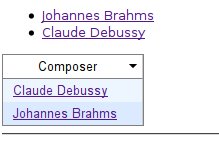
Sample Tables

This is fairly powerful, and for those inexperienced with Ajax provides a quick and simple way to add Ajax features to a web-page or application as it provides Ruby constructs to create the necessary JavaScript and encapsulates the programmer away from the JavaScript. On the other hand, if your an “ace Ajax guru” this doesn’t allow you to directly write and access JavaScript, and the abstraction might seem like an hindrance.

Here’s a quickie overview showing how to use the JMaki features using a 6.1 beta and Ruby on Rails:

http://blogs.sun.com/arungupta/entry/jmaki_on_rails_reloaded_for

And a more recent generic overview using 6.1 & standard HTML/JSP:

http://www.netbeans.org/kb/docs/web/ajax-jmaki-quickstart.html

What’s also useful, is that JMaki in Netbeans creates the same looking code on your HTML rendering page, which means that if you can create JMaki widgets using Java you can easily do the same with RoR, and presumably with PHP.

If your haven’t looked at Netbeans 6.1 or haven’t tried Netbeans in a while, I do think there are some really useful features that sometime give it the edge over it main competitor Eclipse. I use both IDE’s regularly, and prefer Eclipse for Java & Perl development, but for RoR (especially on Linux) and Ajax features I think Netbeans is the winner (for now). However, there is a JMaki plugin for Eclipse which I haven’t tried that might be comparable (for Java applications).

Using both IDE’s could be a useful addition to a programmer’s toolbox. What I must do next is test Netbeans with a J2EE project created under Eclipse and see if I can use both IDE’s on the same project without problems. It be interesting to see if I can edit the Java code with Eclipse and then modify the view and add JavaScript/Ajax feature with Netbeans.

More information about JMaki can be found at:

https://ajax.dev.java.net/

Updated: Fixed version number, it’s Netbeans 6.5 and not 6.1. Fixed typos from writing tooo fast.

Enable mod_perl on Debian, Ubuntu, & Other Linuxes.

To enable mod_perl with Apache2 on Debian & Ubuntu for all directories served up by Apache2, including user directories such as ~/public_html, add the following lines to /etc/apache2/sites-available/default

# enable mod_perl
    <Files ~ ".(pl|cgi)$">
           SetHandler perl-script
           PerlResponseHandler ModPerl::Registry
           Options +ExecCGI
           PerlSendHeader On
    </Files>

In a real production environment you probably don’t want to enable this for all directories that Apache2 serves up, but only from those directories you expect to run perl in.

Thanks to this thread on the Ubuntu Forums for the info.

Titled updated as per Ozkar’s suggestion.

Linux, Python, Boston, Donegal.