I recently upgraded my OnePlus One to Android 6.0.1 and while I can make phone calls I don’t have any network connectivity unless I’m on WiFi. The symptoms are;
Can’t send email,
No access any websites
Phone is not on a LTE network
This awkward fix, posted byrohitvermamech on the OnePlus Forums get’s LTE and networking working again:
Step 1:
Go into Settings > Mobile Networks > Access Point Names > Restore Defaults
The list should now have many many more choices of APNs. Choose the correct APN. Then go into Settings > Mobile Networks > Network Operators (make sure you are connected to WiFi) click “Choose Automatically”. Then turn Aeroplane Mode on and back off. Step 2:
VERY IMPORTANT! Restart your phone. Step 3:
Go into phone and dial *#*#4636#*#* and choose Phone Information. In Phone Information set the Preferred Network Type to LTE/GSM auto (PRL) [even if it says it already, do it again]. Turn off the radio. When the radio is turned off, turn the radio back on. Go down to the SMSC and hit “Refresh” and then “Update”.
Starting on the left is my very last feature phone a Sony Ericsson C902. Of all of these phones it makes the best phone-calls. Keeping this thing as it was such a great phone.
Next, Liz’s first Android phone — a Virgin Mobile LG Optimus V. Keeping this as we can quickly reuse it for any visitors from Ireland and it’s a simple phone to use.
Next is my second Android phone a Samsung S2, I got this phone as the screen on my first Android a HTC Sensation cracked. I still have the HTC as I had plans to replace the screen but it’s hardly worth it at this point. The S2 was quite a step-up, lovely screen but it was missing a little something (this phone is being gifted to a friend for reuse), I hope he finds it better than today’s cheap Android phones.
Next up is my 3rd Android a Google Nexus 4, this was the first Android phone that really, really impressed me and is still a great device — fantastic camera too. I use this as my Irish Phone and it has my Irish SIM card in it and I’ll be walking around Ireland later this week with two phones as my US T-Mobile plan gives me free texts and data while in Ireland, and I can make free phone calls to any Irish phone after topping this up with 20 Euros.
The big yoke is my current phone a OnePlus One, fabulous device almost too big but at least I can read the text on the screen! 😉
To improve performance of the SBGrid Web site I’ve been using Google’s Pagespeed Module for Apache. There is a module available for both Apache & NGinx, and it can improve the performance of a Web site using a number of methods such as minimizing the number of JavaScript and CSS files that need to be downloaded.
We were seeing random 404 errors on Google Pagespeed auto-generated JavaScript and CSS files on the SBGrid’s Web site. These would only occur after the Web server was running for 2 days or more.
The fix for us was to increase Pagespeed’s caches and to give the host (it’s a VM) more RAM.
These are the values that we set:
ModPagespeedFileCacheSizeKb
Set the target size (in kilobytes) for file cache.
ModPagespeedLRUCacheKbPerProcess
Set the total size, in KB, of the per-process in-memory LRU cache.
ModPagespeedLRUCacheByteLimit
Set the maximum byte size entry to store in the per-process in-memory LRU cache.
The first was this graffiti on a brick wall on Boston Newbury’s Street. I was caught it from the right angle and thought the text and the tree were prefect juxtaposed:
The next is this thing made out of cardboard, it looks a bit like a kite and a totem pole done my Mr. Picasso:
It was in a tree near Boston’s MFA (Museum of Fine Arts).
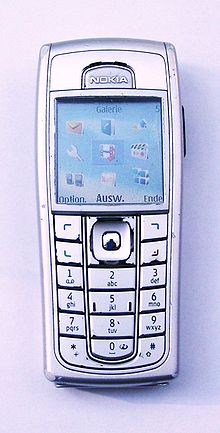
Do you remember when a phone like the Nokia 6230 was the phone to have? I remember trying to get one of these for use in the US after seeing a friend’s phone in Ireland. At the time you could only get this model on the Cingular network and the things cost hundred. This phone was a classic for it’s time and it was durable and just worked and it’s form-factor is a classic from the period.
GSMarena has specs on the phone, and Wikipedia has a badly written page about. Those things sold for hundreds of pounds/euros/dollars when they were new in 2005, now you can get one on Ebay for less than 20 quid.
And these days you can an Android phone on Amazon for as low as $30 that’s more powerful that a 2005 era laptop. And you know, I still want this phone, the only problem is I can’t read the screen as it’s too small!