Good article from BEA about how to write JSR-168 compliant Portlets:
http://dev2dev.bea.com/pub/a/2006/12/writing-jsr-168-portlets.html
Good article from BEA about how to write JSR-168 compliant Portlets:
http://dev2dev.bea.com/pub/a/2006/12/writing-jsr-168-portlets.html
These days there isn’t much you have to do to configure iPod support for Linux. On either Debian or Ubuntu you need to make sure your a member of the plugdev group. To add yourself to the goup do the following either using sudo or as root:
useradd -g plugdev username
Where username, is the username of the user you want to have iPod access.
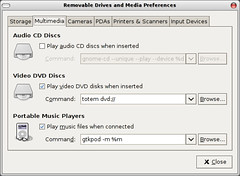
Logout, and login again and your iPod should be mounted when you plug it in. If you use Gnome you can start up the “Removeable Drives & Media” configuration tool (it’s under the System -> Preferences menu). And on the Multimedia tab add the following line to have Gtkpod automatically started when your iPod is attached and told where it was mounted:
gtkpod -m %m
Also, you need to have the sbp2 module loaded. You can manually load it like so:
sudo modprobe sbp2
To have it auto-loaded at boot time add sbp2 to the /etc/modules file.
It’s cold, and I’ve a cold and it’s the weekend! FECK! Was supposed to head down to NYC to see cousin John whose visiting the States for a couple of weeks. Looks like I’ll head down there next weekend instead.
Achoo!

My desktop at home is a system I assembled myself:
I’d like to upgrade the CPU to a AMD dual-core processor, ZipZoomFly has the AMD X2 4800+ for $209, and it’s out of stock! But, before I can upgrade the CPU I need to update the BIOS. Currently, the BIOS is version F7 and it looks like I need F9 or greater to support the newer processors (I bought the motherboard in 2005 before the X2’s were available).
There are 2 ways to update the BIOS:
I only have Debian GNU Linux on the system, and I don’t have a floppy drive which is what you need to make a DOS boot disk. I dual-boot my laptop between Windows XP & Ubuntu Linux, because I need WinXP to VPN to work they just dropped Linux VPN support … but’s that another story if anyone asks I’ll tell it! 🙂 But, the laptop doesn’t have a floppy drive either! It be nice if Motherboards manufacture could provide bootables images so us non-Windows users could just write it to a CD-ROM or a USB drive and boot and flash the BIOS from there.
I know I’d created a DOS boot CD-ROM using Linux a few years ago but I couldn’t quite remember how. I found the old disk image I’d created and mounted it using the loopback interface, but just couldn’t remember what I had to do to … well thanks to that new fangled Google thing I found this: http://www.nenie.org/misc/flashbootcd.html. After 5 minutes of trying to figure out the arguments to cdrecord to tell it what device was the CD-writer and cdrecord -scanbus return nought I used K3B to write the image the image to the CD. But, just what a pain in the backside ….
Is borked! First, changes to some spring projects that it depends on broke the Jetspeed. Jetspeed uses Maven 2, so the spring it uses is an imported Maven project which had a depenceny that wasn’t required and was undownloadable and causes the Jetspeed build to fail. Now I get an error that few people can duplicate:
[echo] portlet-api.version=1.0
[echo] org.apache.jetspeed.deploy.version=2.1-dev
[echo] org.apache.jetspeed.deploy.groupid=org.apache.portals.jetspeed-2
Downloading: mockrunner/mockrunner/0.2.7/mockrunner-0.2.7.pom
[INFO] ————————————————————————
[ERROR] BUILD ERROR
[INFO] ————————————————————————
[INFO] Error executing ant tasksEmbedded error: The following error occurred while executing this line:
/tmp/CUSTOM_PORTAL1/portal-2/etc/build.xml:297: The following error occurred while executing this line:
/tmp/CUSTOM_PORTAL1/portal-2/etc/build.xml:302: The following error occurred while executing this line:
/tmp/CUSTOM_PORTAL1/portal-2/etc/build.xml:489: java.lang.ClassCastException: org.apache.maven.usability.MojoFailureExceptionDiagnoser[INFO] ————————————————————————
Trying to see if I can get a successful build on my personal laptop at home … bugger same errors msgs.
My last pair of glasses broke!. I’ve been using an old, scratched-up pair for the past few weeks. Went to the Optician’s yesterday (Saturday) for the eye-exam; my perscription hasn’t changed which is good news! But, I was a wee bit hung-over from drinking some really fine Belgium beers at Deep Ellum, a new bar that just opened in Union Sq, in Allston, MA (across from the Firestation and near the Model Cafe).
Deep Ellum is a nice wee spot; a wee bit bare but I’m sure that will change as the place ages, decent music, good barmen, and a fairly friendly crowd. It looks like they do some amazing mixed drinks beside great beers. They had this amazing Porter on tap, I think it was Berkshire Coffee Porter, really feckin’ amazing, I’d almost say it’s better than Guinness (at least on draft). Some of the beers are a tad expensive; most are imported Belgium or German beers, or US micro-brews. The thing to watch out for is that a lot of these beers pack some kick, up to 9% or 10& alcohol so drink ’em slow. They do have some cheaper brews like Miller High Life for $2.50, wish they could some other good cheap beers, be interesting to see something like Jupiler beer (one of the biggest brews in Belgium) as a cheapish mass-market alternative. Jupiler is way nicer that Stella Artois.
They do food too, I had this odd dish; fish wrapped in big slices of spud then deep-fried, looked a bit like a cornish pasty. It wasn’t bad, nice batter, fresh fish, but some of the spud was a bit too crunchy. The chips (fries for all you USians) were nice and crisp and the coleslaw was decent. Danny had the Buffalo Wings, which had a good bit of a bite too them, and they tasted fresh not frozen, would have a liked a few more … the food other people were eating looked decent.All in all I’d go back there again, especially for that flipping Porter, wow was that good. If you live nearby I’d strongly recommend popping in for a pint.
OK, back to the glasses, popped over and picked out a pair of frames at Newbury Optical. Dr. Prem there is really nice and they have a good selection of frames. I just wish the friggin’ glasses didn’t cost so much.
Flash 9 was released a few days ago and Debian has packages to install it! But, it, at least for me, hasn’t made it’s way out to the repositories. You can download the package using wget:
wget http://http.us.debian.org/debian/pool/contrib/f/flashplugin-nonfree/flashplugin-nonfree_9.0.31.0.1_i386.deb
Then install it using dpkg either as root or using sudo:
sudo dpkg -i flashplugin-nonfree_9.0.31.0.1_i386.deb
Also, make sure that Flashplayer 8 isn’t installed:
sudo apt-get remove --purge flashplayer-mozilla
This should work for any Debian Testing or Unstable system.
First post … er I mean blog.
About me:
Software Engineer in Boston.
Using Linux for years.
From Ireland.