These days there isn’t much you have to do to configure iPod support for Linux. On either Debian or Ubuntu you need to make sure your a member of the plugdev group. To add yourself to the goup do the following either using sudo or as root:
useradd -g plugdev username
Where username, is the username of the user you want to have iPod access.
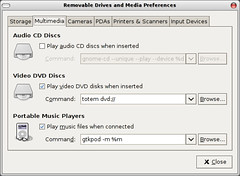
Logout, and login again and your iPod should be mounted when you plug it in. If you use Gnome you can start up the “Removeable Drives & Media” configuration tool (it’s under the System -> Preferences menu). And on the Multimedia tab add the following line to have Gtkpod automatically started when your iPod is attached and told where it was mounted:
gtkpod -m %m
Also, you need to have the sbp2 module loaded. You can manually load it like so:
sudo modprobe sbp2
To have it auto-loaded at boot time add sbp2 to the /etc/modules file.