All posts by Mick

Got a T400

I recently got an Lenovo T400 and this thing works great with the latest version of Ubuntu (Intrepid).

To install Ubuntu, you have to make sure you edit the BIOS settings and change the graphics to use one of the 2 build in graphics cards. If you want to save the Vista bootloader and access to Lenovo’s restore partition, you must not install grub on the MBR (Master Boot Record). Instead, install grub on the same partition as where the kernel resides. (This will be either /boot or / ) Then install EasyBCD¹ on Vista and add Ubuntu to Vista’s bootloader.

I was going to install Debian on the laptop, but I went w/ Ubuntu Intrepid instead as it has a 2.6.27 kernel which (supposedly) has better support for some the hardware on the T400 (and for my new Sony MP3 Walkman). I could have installed Debian and compiled my own 2.6.27 kernel, but these days I couldn’t be bothered spending ages compiling, testing, and debugging my own kernel.

¹For instructions on how to use EasyBCD see: http://neosmart.net/wiki/display/EBCD/Ubuntu

http://timony.com/mickzblog/2009/01/22/got-a-t400

Adobe Flash Sound not working with Iceweasel on Debian?

After upgrading to Flash 10 sound stopped working. Installing the flashplugin-nonfree-extrasound package solved that problem for me:

aptitude install flashplugin-nonfree-extrasound

If your using pulse audio, install the flashplugin-nonfree-pulse package. It doesn’t look like the Debian flash plug-in suggests either package:

apt-cache show flashplugin-nonfree|more
Package: flashplugin-nonfree
Priority: optional
Section: contrib/web

Suggests: iceweasel, konqueror-nsplugins, x-ttcidfont-conf, msttcorefonts, ttf-dejavu, ttf-xfree86-nonfree, xfs (>= 1:1.0.1-5)

How to get from one terminal to another at Boston’s Logan Airport

I wrote this up for a friend who is arriving at Boston’s Logan Airport and whom has never been to Boston before. She has to get from Terminal E (Aer Lingus) to Terminal B (US Airways). It’s pretty simple, and I thought this might be of use to someone else:

It’s not a big airport, but it’s a lot bigger than Dublin Airport.  There’s 5 terminals; A, B, C, D, and E. It might seem confusing how to get one from one to another, and how to get to Downtown Boston (the city center) if you don’t know where to go! But, it’s really very very simple, as they have free shuttle buses connecting all the terminals.

You will arrive at Terminal E (used for most of international arrivals/departures).
US Airways is at Terminal B.

Exit terminal E, and look for the signs for the Airport Shuttle Bus (they’re across the street in  this sorta big traffic island thingy).

They have at least 3 different routes for the shuttle bus, they have signs that say what bus goes to what terminal.
Catch the bus that goes to Terminal B:
http://www.massport.com/logan/insid_termi_b.html

If you’ve a lot of bags, don’t get on at the front door, get on at the middle door. Waiting for the bus and getting to the terminal will take about 10 minutes. So relax and have a smoke while you wait, in Massachusetts you cannot smoke anywhere indoors.

There’s a good variety of restaurants at Terminal B, I suggest stopping at Bonfire for a steak if you’ve time, if you don’t have time get a sandwich from “Au Bon Pain“.

So, in summary, catch the shuttle bus from terminal E to terminal B. 🙂

If your arriving at any other terminal and need to get to another terminal at the airport it’s basically the same procedure. All you need to know is what terminal you need to get to, if you don’t know ask any of the Airport staff, or at an Information Desk, or alternatively ask the Shuttle Bus drivers which Terminal your airline is at. Also, the Airport’s Shuttle Buses are free, the Silver Line (which is part of the public transit system is not free and will take you to South Station, one of Boston’s major train stations).

If your delayed at the airport and have a lot of time to kill, I’d suggest going to the Hyatt Hotel at the airport. It’s connected to the garage, which I think is called Central Parking. It’s a good spot to spend a few hours, has a nice view, and the food ain’t bad and it’s a nice place to relax away from the hustle and bustle of the Airport terminals. Alternatively go to Terminal B which seems to have a pretty decent collection of restaurants.

If you’ve more that 4 hours to kill, it’s also very easy to get into the city. What I’d suggest for tourists to do is to catch the shuttle bus to the Subway line (the Blue Line). Catch this inbound to Government Center, which is less than a 10 minute subway ride. Fanueil Hall which is about 5 minutes walk from there has plenty of stores (shops for all you Irish and Brits) and restuarants and pubs. I quite like Durgin Park and their Yankee Roast followed by their traditional style Strawberry Shortcake for desert.

It’s also less than 10 minutes walk from both the State House, Boston Common, and 2 minutes walk from the Old State House (the seat of British rule during colonial times).

I’ll try and update this posting with relevant information.

http://timony.com/mickzblog/2008/12/15/getting-from-one-terminal-to-another-at-bostons-logan-airport


Netbeans 6.5 on Debian

Doesn’t perform badly, I’ve been using it recently with Ruby code, and I like how it colourises the code to make editing code easier, and performs it auto-completion and method lookup (basically all the features you’d expect with a modern IDE).

It’s does’t startup as fast as using Emacs, or vi, but I find the features very handy and very convenient. It doesn’t look  bad either. It runs better on my PC at home running Debian Linux than it does on my PC at work running WinXP. This is probably because I’m using a 1.5 JVM on WinXP and a 1.6 JVM on Debian. Running on 1.6 JVM’s means that Netbeans will automatically use anti-aliased fonts if you have anti-aliased fonts enabled (much easier on the eyes if your using a LCD screen).

Dell Laptops & Ubuntu

I’d heard that Dell were offering Ubuntu Linux on some of their laptops and I hadn’t really looked into it. But I came across this page the other day and it’s pretty neat to get Ubuntu (or any Linux) preloaded on a laptop from a major vendor:

http://www.dell.com/content/topics/segtopic.aspx/linux_3x?c=us&cs=19&l=en&s=d

It’s good to support coming from a major vendor, and Dell even offer’s a repo so you can get BIOS updates for support hardware:

http://timony.com/mickzblog/2008/02/05/dell-bios-updates-using-linux/

However, I’m still partial to getting Lenovo’s T400 over a Dell.

Support Pine Street Inn

Support Boston’s Pine Street Inn this year and buy holidays cards based on a photograph I took:

http://www.pinestreetinn.org/news.php?id=343

The photograph also came 24th in the Boston Globe’s 2008 Winter Wonderland contest:

http://timony.com/mickzblog/2008/02/22/winter-wonderland-24/

Boston Sunset

Penny over at BostonZest did a write up on this and asked me to comment on the picture:

http://www.bostonzest.com/2008/10/holiday-cards-to-support-pine-street-inn.html

Updated: Oct 25th with updated link to Pine Street Inn’s Greeting Card page.

KDE4 and Debian

I figured it’s time for me to try and install kde4 again! Previously I had to remove KDE4 due to package conflicts. There are installation instructions at:

http://pkg-kde.alioth.debian.org/experimental.html

So following the instructions there on what changes to make to your sources.list, and then run:

aptitude update

I’ve had some dependency issues, and installing the kde4 package (a meta-package that will install all of KDE4) would not install due to dependency issues with the kdegraphics package. The way around this is to install the kde4-minimal package and whichever of the other packages you want. So I installed everything, minus the kdegraphics package via the following:

aptitude install -t experimental kde4-minimal kdeplasma-addons kdegames kdemultimedia kdenetwork kdepim kdeutils kdeedu kdeadmin kdeartwork kdetoy

Be prepared for a lot of packages to be installed, for others to be removed, and to possibly break your existing kde3 installation (if you have one). See the first comment to see what I had to install and remove.

Firstly, KDE4 does not import any of your KDE3 settings, which is pretty annoying, as all of the applications start with the default settings, and is really annoying with applications like kmail … however some has created a tool to import the settings:

http://silentcoder.co.za/silentcoder/?page_id=330

My only complaint about the tool, is that it requires root to install it. I’d also like the option to be able to run the tool without first having to install it. Anyways, it seems to work pretty well and imported all of my mail into kmail, the only thing it didn’t do was import account settings into kmail.

This post is a work in progress, I’ll update it over the next day or so with any further instructions as I install, configure, and test KDE4.

Debian’s e17 Packages

I thought I’d start looking at using Debian’s experimental E17 packages. I commented out all other E17 repo’s from my source.list and installed the debian e17 package. It installs a minimal amount of related packages, and there doesn’t seem to be lot of e17 packages available in the experimental repo

sudo aptitude install e17
Reading package lists… Done
Building dependency tree
Reading state information… Done
Reading extended state information
Initializing package states… Done
Reading task descriptions… Done
The following NEW packages will be installed:
e17 e17-data{a} libecore-con0{a} libecore-evas0{a} libecore-fb0{a} libecore-file0{a} libecore-imf0{a} libecore-ipc0{a} libecore-job0{a} libecore-txt0{a} libecore-x0{a} libecore0{a}
libedbus0{a} libedje0{a} libeet1{a} libefreet0{a} libembryo0{a} libevas-engines{a} libevas0{a}
0 packages upgraded, 19 newly installed, 0 to remove and 0 not upgraded.
Need to get 8110kB of archives. After unpacking 15.5MB will be used.

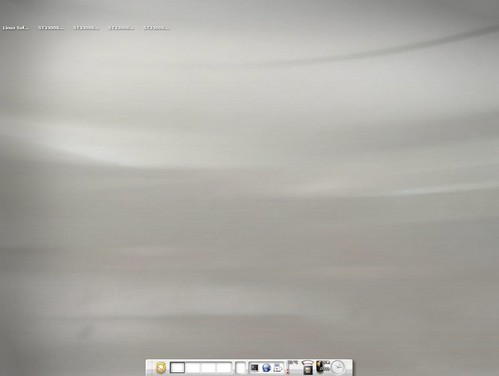
This appears to provide a good basic E17 Desktop, but provides no additional themes, and I’m not sure how many modules it includes. Here’s a screenshot:
Default Debian E17 Install

If you want to use this add the following to your /etc/apt/sources.list:

deb http://ftp.us.debian.org/debian/ experimental main non-free contrib

This also includes KDE4 packages. You’ll want to be careful with this repo, that you don’t pull in and install too many (possibly breaking) packages from it.

Look for my latest posting on E17 as this information could be out-of-date:

http://timony.com/mickzblog/category/e17/

But I don’t want a PDF?

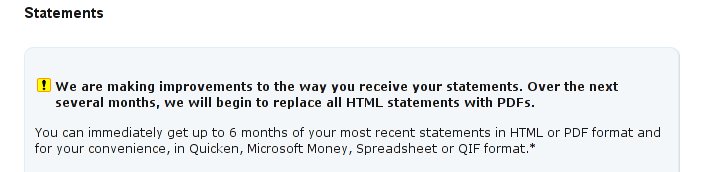
WTF is Citibank thinking with their web interface:

We are making improvements to the way you receive your statements. Over the next several months, we will begin to replace all HTML statements with PDFs.

When I’m looking at my old statements I don’t want to have to wait for a PDF to download, then for Adobe Acrobat to open just so I can briefly look at an old statement.

Come on there Citibank, give me a default option to view this information in HTML (as a webpage) so I can see if it’s the information I need, then let me choose if I want it as a PDF, or excel file …

Lenovo Laptop?

I’m thinking of getting a new laptop either the Lenova ThinkPad T400 (which is a replacement for the T61), or the IdeaPad U330 to replace my aging Dell 700m

The big thing for me is do they work with Linux (for me specifically Debian or Ubuntu).

For anyone interested in either laptop, looks like the the U330 works (near) flawlessly with Ubuntu. See this posting on this thread for an enthusiastic comment:

http://ubuntuforums.org/showpost.php?p=5741753&postcount=5

And with the T400 you’ll have some work to get everything working smoothy. Such as the dual-graphics cards which is how Lenovo get’s up to 10 hours of battery life from the T400.

However, if you don’t mind using breaking stuff, the new Beta version of Ubuntu appears to work reasonably well on the T400. See this blog posting and this thead on Lenova’s forums for more details.

I’m torn between either, the small size of the U330, versus the better battery life of the T400 (and the fact that both are a weeeeee bit dear).

OK, I’m tired as I write this, and I find sometimes when I “blog while tired” that my grammar/spelling/ability to make sense suffers, so maybe I’ll rewrite this in the morning. 🙂