Aha! There is RoR support for Eclipse, via Aptana. I’ve just installed it and the instructions are a bit cryptic. Basically you have to install Aptana first (you can do this as an Eclipse plug-in). Then restart Eclipse and then install the Rails plugin called RadRails. Aptana also has Python and PHP support.
Install Aptana:
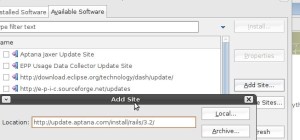
In Eclipse click on Help->Software Updates. Then click on the Available Software tab, then click on Add Site and paste this URL into the Dialog Box that opens:
http://update.aptana.com/install/3.2/
Install Aptana, then restart Eclipse. Aptana will then prompt you to install the Subversion plugin, then restart.
When Eclipse restarts following the same procedure as above, except add the following site for Rails support:
http://update.aptana.com/install/rails/3.2/
And restart Eclipse. Aptanta may prompt for further plugins, some of which are from their Professional version which will only work for 60 days.
This works with Eclipse 3.4, and should work on 3.3 and 3.2.
IBM shows how to use RadRails:
http://www.ibm.com/developerworks/opensource/library/os-ecl-radrails/
Complete install instructions: